✓ Free to start · iOS & Android

Smart safety for
modern communities.

Live alerts from official channels and your community, with how close your family is to each one. A Risk Radar that warns you before you drive into an area with recent car thefts or accidents. Home, School and Work notices, so the whole family knows everyone arrived safely. Built with privacy as a first principle.

Searching the App Store instead? Look for "SpotterApp" — "Spotter" alone belongs to a different, unrelated app.

9:41 ●●●
Spotter
➤ Melton
⚠️
Send alert
Notify your network instantly
›
📊
Area Insights
See where incidents cluster near you
›
Live Activity See All
Nearby Everywhere
▦4
All
🔥1
Fire
🚗1
Accidents
🚙1
Vehicles
👥1
Community

Demo preview — sample alerts for illustration

Built with enterprise-grade infrastructure

App Attest Secure
🛡️ Official Alerts Integrated
🔍 Official Missing Persons Data
🔒 Privacy-First Design

See Spotter in action.

A short tour of the app, from live alerts to keeping your family safe.

Your people, in one walkthrough

Tap a topic to jump straight to it: live alerts with your family's distance on them, finding out when someone you love is near an incident, Risk Radar warnings before you enter a high-risk area, one-tap messages, saved places that tell your family when you arrive, and naming your people.

Shown on iPhone with sample data for illustration.

Safety in everyday life.

Six ordinary moments where Spotter quietly does its job.

Saturday at the market

You drive to a market you have never been to. As you reach the area, your phone buzzes: “High risk detected: 6 car thefts reported nearby, in the last 3 days.”

You park on the busy street instead and take your bag with you. Nothing was said by a stranger, and you never opened the app.

Did the kids get to school?

You save Home and School once. At 8:42 every morning your family sees “Anju arrived at School”, and at 3:50 “Anju left School”.

No “are you there yet?” texts. Whoever is at work knows, and so does Nana, if you chose to tell her.

A bushfire near Mum

A fire starts near the town where Mum lives. Spotter shows the alert and says “Mum is 450 m from this”.

One tap asks “Are you OK?”. It only speaks when her location is recent and shared with you, so it never guesses.

Walking home late

The last train was late and the street is dark. You tap one button and your family circle gets a message with your location.

No menus, no typing. Free for everyone, always.

Mum, Dad, Sam

You call them what you call them. Notifications use your names too: “Dad arrived at Work”, not a username.

Only you see the names you give, and each person chooses how their own family sees them.

Choosing where to rent

You are choosing between two suburbs. The heat map shows where car thefts and other incidents have clustered over the last months.

You see the pattern instead of one alert. Locations are approximate, never an exact pin.

These are illustrative scenarios showing how each feature behaves, not customer stories. Spotter only mentions where someone is when they have chosen to share it with you.

Engineered for awareness.

We completely reimagined community safety. No ads, no tracking, just powerful tools to keep your neighborhood and family secure.

📡 Risk Radar NEW

Spotter keeps watch in the background, comparing the places you travel through with real incident reports: car thefts, accidents, fires and more. If you are about to enter an area where something has been happening, you get a heads-up, even when the app is closed, so you can take precautions before you arrive. Quiet until it matters, and at most one warning per area a week.
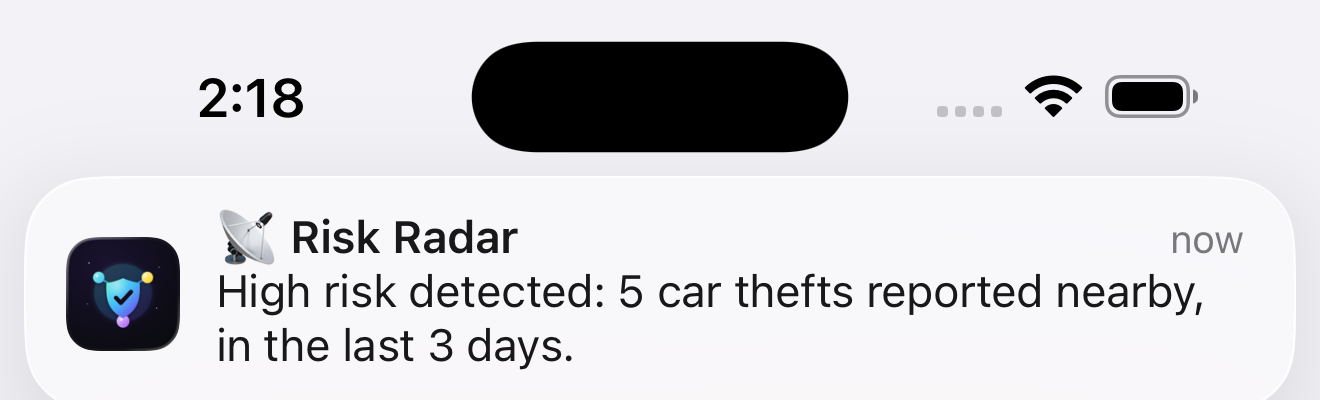
Risk Radar proactive alert notification

Spot Flares

Alert your community instantly about local hazards and incidents. Drop a flare, and notify everyone nearby in milliseconds. The live feed shows how far each alert is from the people you care about.
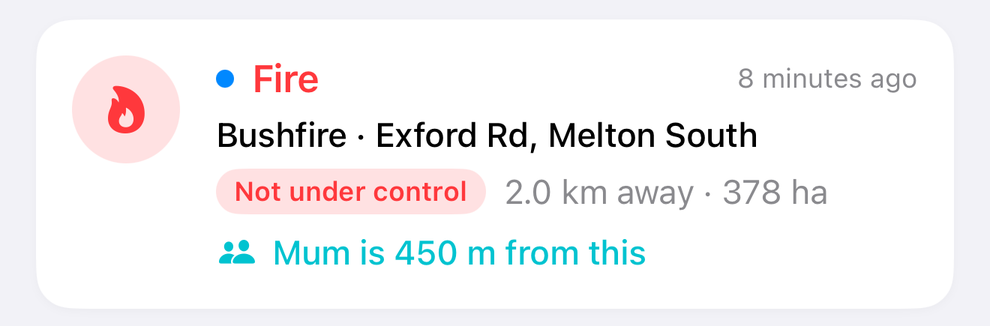
A live fire alert in Spotter with 'Mum is 450 m from this' under it

On-Device AI

Scan against your secure vault entirely on-device using advanced CoreML. No cloud processing means total privacy and instant results.
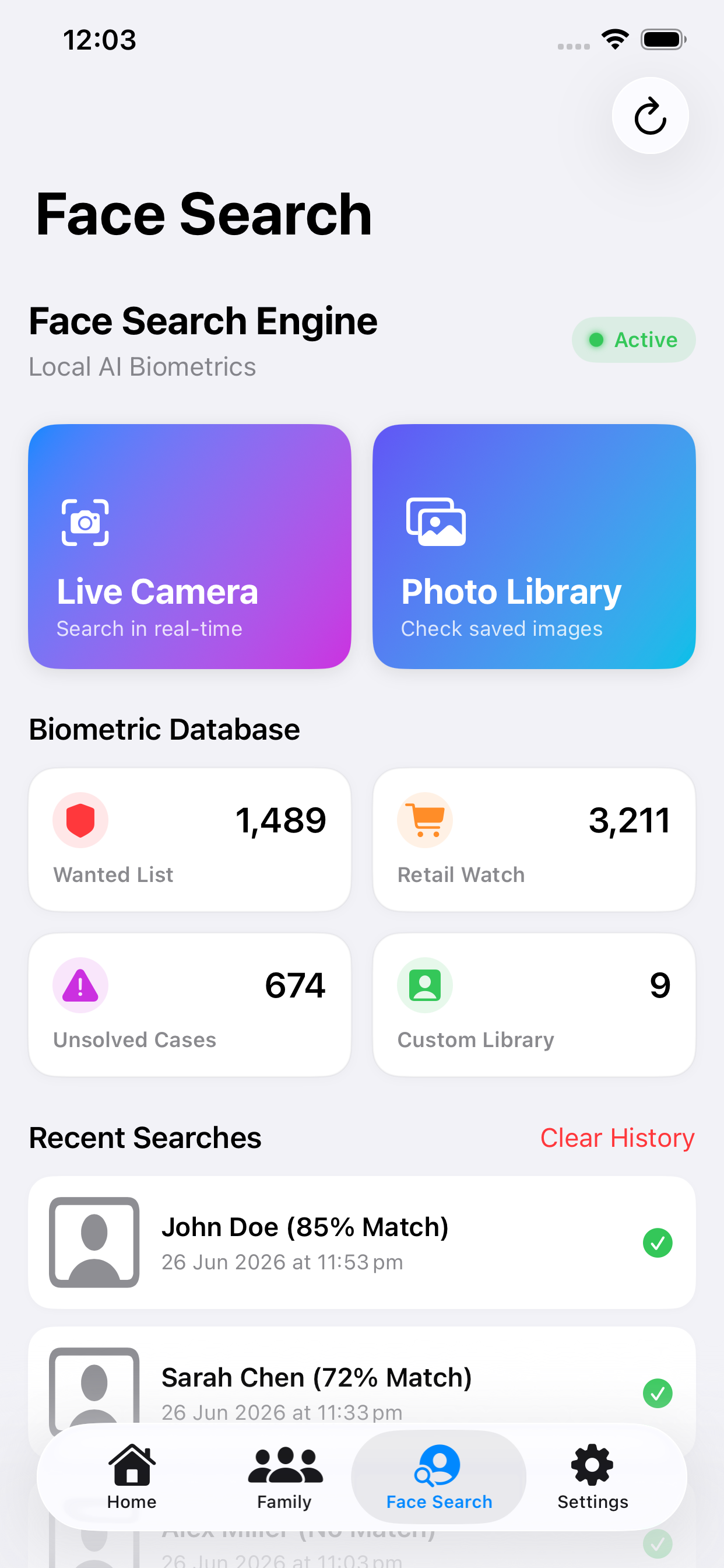
Spot screen: on-device face search and watchlists

Family Map

Keep track of your loved ones on a private map, and call them what you call them: Mum, Dad, Sam. Invites need approval on both sides. Pause sharing anytime, or share an approximate, suburb-level location instead of your exact position.
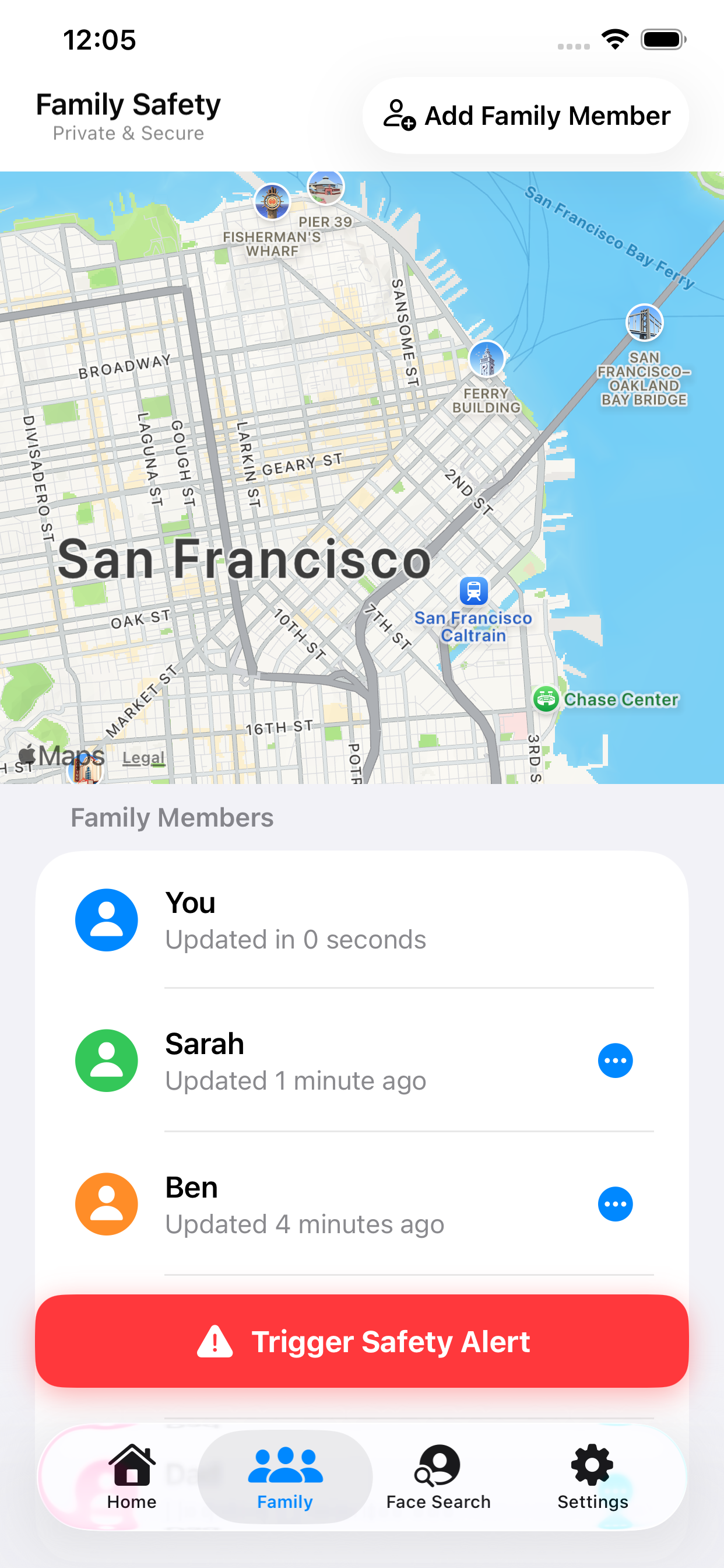
Family page with a map, and Mum, Dad and Sister with how recent and how far each person is

Know When Family Is Near an Alert NEW

If someone you love is within 1 km of a fire or accident, Spotter tells you, with their distance, and you can ask “Are you OK?” in one tap. Only when their location is recent and shared with you, never a guess.
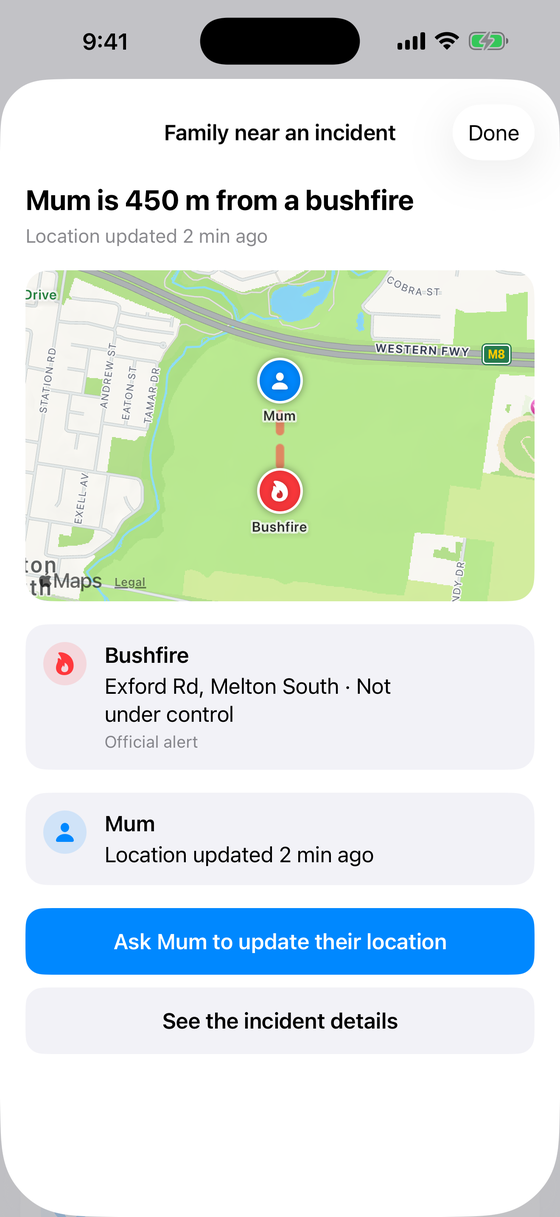
Family near an incident screen: Mum is 450 m from a bushfire, with a map of both

One-Tap Safety Alert

Send an instant alert with a custom message to your family circle when you need help — no fumbling through menus in an urgent moment.
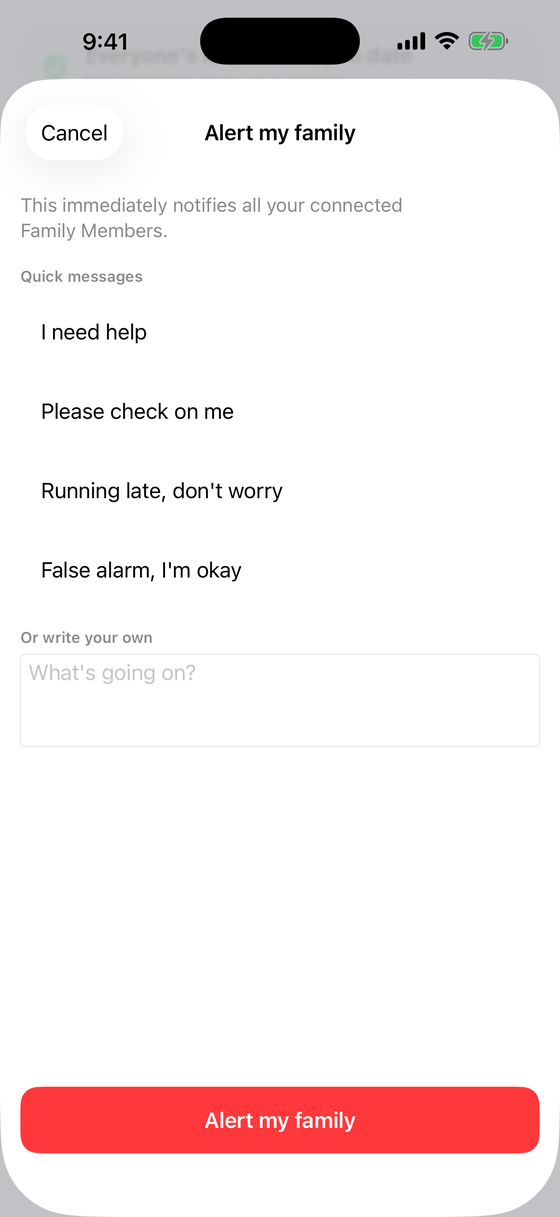
Alert my family sheet with quick messages like I need help and Please check on me

Home, School, Work NEW

Save up to five places that matter, such as Home, School and Work, and your family is told when you arrive or leave: “Anju arrived at School · 8:42 am”. Everyone sees how everyone else is doing without a single phone call. A recent-activity list lets you look back, you choose who is told for each place, and nothing is sent while sharing is paused.
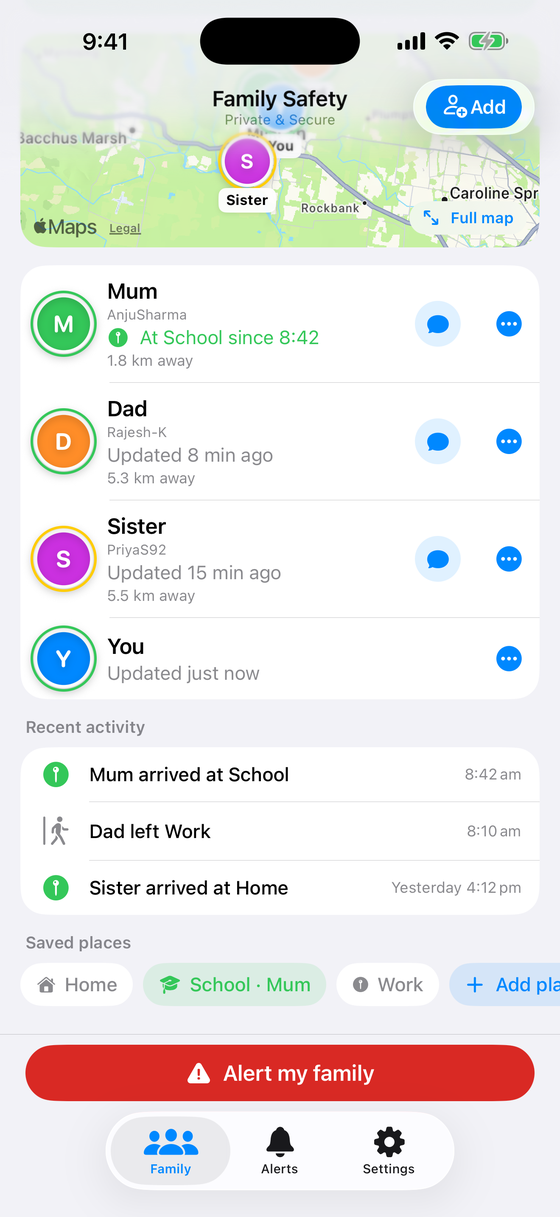
Family page: Mum at School since 8:42, recent activity and saved places

Call Them Mum or Dad NEW

Give each person the name you use for them. Only you see it, and notifications use it too: “Mum is 450 m from this.” You choose how your own family sees you as well.
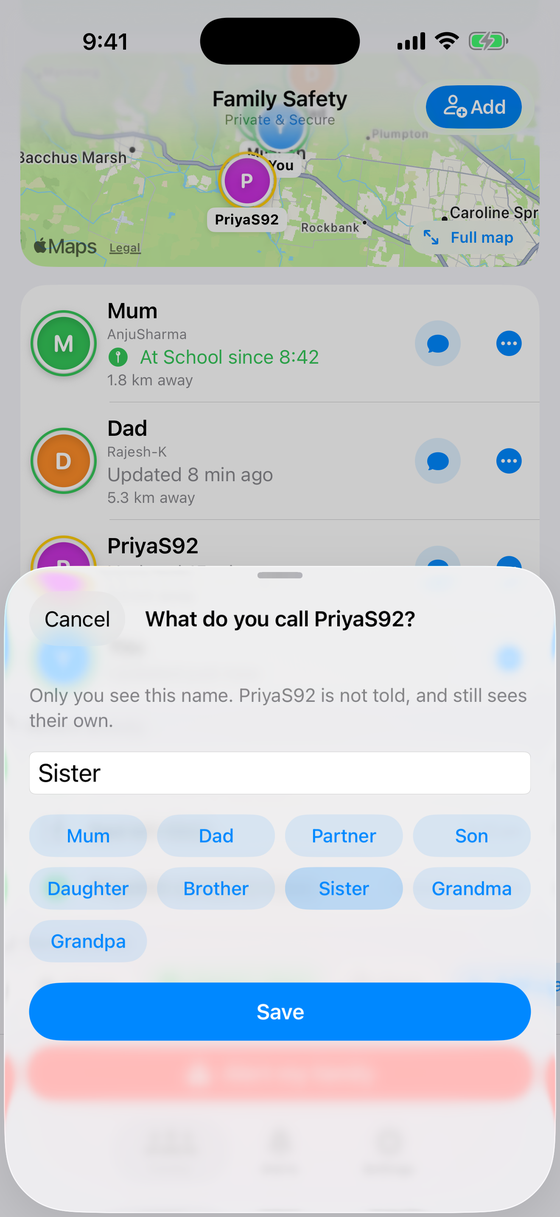
What do you call this person: one-tap suggestions Mum, Dad, Partner, Son, Daughter

Area Insights NEW

A heat map of what has been happening around you, by type of incident, so you can see the pattern and not just the latest alert. Locations are approximate, never an exact pin.
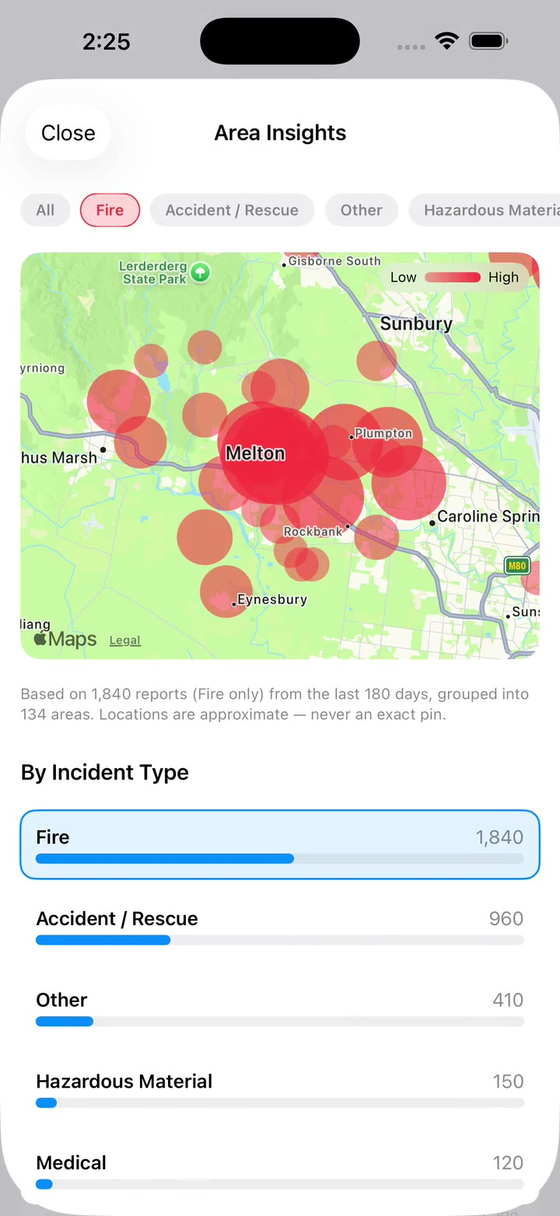
Area Insights heat map of incidents with a breakdown by type

Missing Persons

Browse profiles sourced from the National Missing Persons Coordination Centre, and optionally run an on-device face match against your camera to help.

Public records only

Share Straight from Any App

Got a photo from a doorbell camera, a group chat, or a news article? Share it directly into Spotter to run a face match, without leaving the app you're in.

Spotter app icon
Spotter in your Share menu

Filter the Noise

Set how close an alert has to be before you hear about it, from 1 km up to 10 km for each type of alert, so you only get what is actually relevant to you.

🚨 Emergencies 5 km

Privacy-First Mapping

Reporting shouldn't compromise your safety. For non-critical alerts, Spotter uses location obfuscation, showing a generalized shaded zone instead of your exact GPS pin.

📍

Privacy, plainly explained.

We'd rather tell you exactly what happens to your data than make vague promises. Here's the honest breakdown.

On-Device Face Matching

Face comparison runs entirely on your device using CoreML. Photos and face data are never uploaded — matching happens locally, against public wanted/missing-persons watchlists or your own private list, and nothing leaves your phone.

Encrypted in Transit, Approval-Gated

Family location updates travel over encrypted (TLS) connections and are only ever visible to family members who've explicitly accepted your invite. We don't sell location data or share it with third parties. We're not claiming zero-knowledge here — the server needs to route locations to approved family members to make live sharing work at all — and we'd rather say that plainly than overstate it.

Our Mission

Spotter was born out of a simple idea: communities should be able to protect each other without sacrificing their privacy. We believe technology can help neighborhoods stay informed and families stay connected, built by being upfront about what data we handle and why — not by overselling what "private" means.

Spotter is built and operated by Mynetra Pty Ltd (ACN 678 559 736), an Australian software and technology company (about Mynetra). Questions, feedback, or concerns — get in touch.

Questions people actually ask.

Straight answers, including the hard ones.

Why does a safety app need face search — isn't that creepy?

It's not a general "search anyone" tool. Face matching only runs against closed, named lists — public wanted/missing-persons registries, or your own private list — never a general web or social-media search. Comparison happens entirely on your device; photos are never uploaded anywhere. That's a deliberate design choice, not a limitation we're working around.

Family location tracking can be misused for stalking or domestic abuse. What do you do about that?

Every connection requires mutual approval — no one can add you without your consent. You can pause sharing, or switch to an approximate suburb-level location instead of your exact position, at any time. Removing a connection takes effect immediately and isn't announced to the removed person, so leaving quietly doesn't tip anyone off. It's not a perfect solution to a hard problem, but it's one we keep working on.

Is my data really private? What's actually encrypted?

We'd rather be precise than reassuring. Face data never leaves your device — that part is genuinely zero-knowledge. Family location is transmitted over an encrypted (TLS) connection and only shared with people you've approved, but it isn't end-to-end encrypted — our server needs to route it to make live sharing work. See the Security section and our Privacy Policy for the full breakdown.

Why not just use the official emergency apps?

You should still use them — Spotter isn't a replacement for official emergency channels, and we say that explicitly in the app. What Spotter adds is bringing several official sources (emergency incidents, stolen vehicle registers, missing persons) together with family safety tools in one place, instead of checking several separate sources.

Is SpotterApp really free?

SpotterApp is free to download and use. Emergency alerts, Risk Radar, Area Insights, location sharing, “I’m OK” and sending an alert to your family are always free. SpotterApp Plus is an optional paid plan with more room: more than 3 family members, more than 2 saved places, more than 3 face searches a month, 30 days of family activity (the free plan shows 2 days), and your full alert history (the free plan shows your latest 10). Nothing is ever paywalled mid-emergency. If you already subscribed, your subscription continues until you cancel it in your Apple ID or Google Play settings.

Who's actually behind this?

Spotter is built and operated by Mynetra Pty Ltd (ACN 678 559 736), an Australian software and technology company — not a government body. Questions or concerns are welcome any time at partnerships@spotterapp.com.au.

Get in Touch.

Have questions, feedback, or need support? We're here to help.

Contact Support

Take control of your community's safety.

App Store Google Play